The complete list of PowerShell ISE 3.0 keyboard shortcuts

In a previous tip I showed a new hidden keyboard shortcut to transpose lines of code in the ISE. At the PowerShell Facebook group, Dave Carnahan was wondering if there’s a way to pull all of the ISE related hot keys.
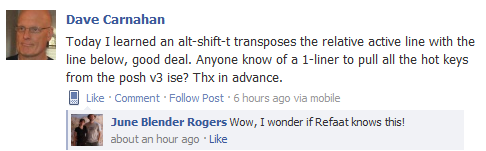
Dave, this is for you. 🙂
All shortcuts are contained in the ISE Microsoft.PowerShell.GPowerShell assembly (DLL). We first need to get a reference to that DLL.
PS> $gps = $psISE.GetType().Assembly
PS> $gps

GAC    Version        Location
---    -------        --------
True   v4.0.30319     C:\Windows\Microsoft.Net\assembly\GAC_MSIL\Microsoft.PowerShell.GPowerShell\...
Then we can get a list of all the resources in this assembly:
PS> $gps.GetManifestResourceNames()

Microsoft.PowerShell.GPowerShell.g.resources
GuiStrings.resources
Next we create a ResourceManager object which provides access to the assembly resources. We pass it the name of the resource we want to access without the .resources extension, and the assembly containing the resources.
$rm = New-Object System.Resources.ResourceManager GuiStrings,$gps
All that’s left is calling the GetResourceSet() method to retrieve the resource set for a particular culture.
$rs = $rm.GetResourceSet((Get-Culture),$true,$true)
$rs

Name                           Value
----                           -----
SnippetToolTipPath             Path: {0}
MediumSlateBlueColorName       Medium Slate Blue
EditorBoxSelectLineDownShor... Alt+Shift+Down
NewRunspace                    N_ew PowerShell Tab
EditorSelectToPreviousChara... Shift+Left
RemoveAllBreakpointsShortcut   Ctrl+Shift+F9
SaveScriptQuestion             Save {0}?
(...)
Looking at the output we can see that the highlighted items value resembles key combinations. If you look at your output you will notice items with a name that ends with ‘Shortcut’ (with or without a trailing digit) and items that relates to Function keys. They start with F, followed by a digit or two and the word ‘Keyboard’. With the following line we can filter all keyboard related items and sort them out.
$rs | where Name -match 'Shortcut\d?$|^F\d+Keyboard' | Sort-Object Value
Here’s the full code snippet and the full result, start digging 😉
UPDATE: Thanks to June Blender Rogers for reporting this. It looks like the list was missing one shortcut: Go to match – Ctrl+]. It doesn’t appear in the list and it’s likely hard-coded in the menu item. PowerShell scripts are full with brace/bracket/parenthesis characters and sometimes you may find it hard to locate the closing or opening bracket. In these cases, the ‘Go to match’ keyboard shortcut comes very handy. Just place the cursor in front of a bracket and press the shortcut key combination; you’ll see it jumping to the matching one and highlighting it.
$gps = $psISE.GetType().Assembly
$rm = New-Object System.Resources.ResourceManager GuiStrings,$gps
$rs = $rm.GetResourceSet((Get-Culture),$true,$true)
$rs | where Name -match 'Shortcut\d?$|^F\d+Keyboard' | Sort-Object Value | Format-Table -AutoSize

Name                                            Value
----                                            -----
EditorUndoShortcut2                             Alt+Backspace
EditorSelectNextSiblingShortcut                 Alt+Down
ExitShortcut                                    Alt+F4
EditorSelectEnclosingShortcut                   Alt+Left
EditorSelectFirstChildShortcut                  Alt+Right
EditorRedoShortcut2                             Alt+Shift+Backspace
EditorBoxSelectLineDownShortcut                 Alt+Shift+Down
ToggleHorizontalAddOnPaneShortcut               Alt+Shift+H
EditorBoxSelectToPreviousCharacterShortcut      Alt+Shift+Left
EditorBoxSelectToNextCharacterShortcut          Alt+Shift+Right
EditorTransposeLineShortcut                     Alt+Shift+T
EditorBoxSelectLineUpShortcut                   Alt+Shift+Up
ToggleVerticalAddOnPaneShortcut                 Alt+Shift+V
EditorSelectPreviousSiblingShortcut             Alt+Up
ShowScriptPaneTopShortcut                       Ctrl+1
ShowScriptPaneRightShortcut                     Ctrl+2
ShowScriptPaneMaximizedShortcut                 Ctrl+3
EditorSelectAllShortcut                         Ctrl+A
ZoomIn1Shortcut                                 Ctrl+Add
EditorMoveCurrentLineToBottomShortcut           Ctrl+Alt+End
EditorMoveCurrentLineToTopShortcut              Ctrl+Alt+Home
EditorDeleteWordToLeftShortcut                  Ctrl+Backspace
StopExecutionShortcut                           Ctrl+Break
StopAndCopyShortcut                             Ctrl+C
GoToConsoleShortcut                             Ctrl+D
EditorDeleteWordToRightShortcut                 Ctrl+Del
EditorScrollDownAndMoveCaretIfNecessaryShortcut Ctrl+Down
EditorMoveToEndOfDocumentShortcut               Ctrl+End
FindShortcut                                    Ctrl+F
ShowCommandShortcut                             Ctrl+F1
CloseScriptShortcut                             Ctrl+F4
GoToLineShortcut                                Ctrl+G
ReplaceShortcut                                 Ctrl+H
EditorMoveToStartOfDocumentShortcut             Ctrl+Home
GoToEditorShortcut                              Ctrl+I
Copy2Shortcut                                   Ctrl+Ins
ShowSnippetShortcut                             Ctrl+J
EditorMoveToPreviousWordShortcut                Ctrl+Left
ToggleOutliningExpansionShortcut                Ctrl+M
ZoomOut3Shortcut                                Ctrl+Minus
NewScriptShortcut                               Ctrl+N
OpenScriptShortcut                              Ctrl+O
GoToMatchShortcut                               Ctrl+Oem6
ZoomIn3Shortcut                                 Ctrl+Plus
ToggleScriptPaneShortcut                        Ctrl+R
EditorMoveToNextWordShortcut                    Ctrl+Right
SaveScriptShortcut                              Ctrl+S
ZoomIn2Shortcut                                 Ctrl+Shift+Add
GetCallStackShortcut                            Ctrl+Shift+D
EditorSelectToEndOfDocumentShortcut             Ctrl+Shift+End
RemoveAllBreakpointsShortcut                    Ctrl+Shift+F9
HideHorizontalAddOnToolShortcut                 Ctrl+Shift+H
EditorSelectToStartOfDocumentShortcut           Ctrl+Shift+Home
ListBreakpointsShortcut                         Ctrl+Shift+L
EditorSelectToPreviousWordShortcut              Ctrl+Shift+Left
ZoomOut4Shortcut                                Ctrl+Shift+Minus
StartPowerShellShortcut                         Ctrl+Shift+P
ZoomIn4Shortcut                                 Ctrl+Shift+Plus
NewRemotePowerShellTabShortcut                  Ctrl+Shift+R
EditorSelectToNextWordShortcut                  Ctrl+Shift+Right
ZoomOut2Shortcut                                Ctrl+Shift+Subtract
EditorMakeUppercaseShortcut                     Ctrl+Shift+U
HideVerticalAddOnToolShortcut                   Ctrl+Shift+V
IntellisenseShortcut                            Ctrl+Space
ZoomOut1Shortcut                                Ctrl+Subtract
NewRunspaceShortcut                             Ctrl+T
EditorMakeLowercaseShortcut                     Ctrl+U
EditorScrollUpAndMoveCaretIfNecessaryShortcut   Ctrl+Up
Paste1Shortcut                                  Ctrl+V
CloseRunspaceShortcut                           Ctrl+W
Cut1Shortcut                                    Ctrl+X
EditorRedoShortcut1                             Ctrl+Y
EditorUndoShortcut1                             Ctrl+Z
F1KeyboardDisplayName                           F1
HelpShortcut                                    F1
StepOverShortcut                                F10
F10KeyboardDisplayName                          F10
StepIntoShortcut                                F11
F11KeyboardDisplayName                          F11
F12KeyboardDisplayName                          F12
F2KeyboardDisplayName                           F2
FindNextShortcut                                F3
F3KeyboardDisplayName                           F3
F4KeyboardDisplayName                           F4
RunScriptShortcut                               F5
F5KeyboardDisplayName                           F5
F6KeyboardDisplayName                           F6
F7KeyboardDisplayName                           F7
RunSelectionShortcut                            F8
F8KeyboardDisplayName                           F8
F9KeyboardDisplayName                           F9
ToggleBreakpointShortcut                        F9
EditorDeleteCharacterToLeftShortcut             Shift+Backspace
Cut2Shortcut                                    Shift+Del
EditorSelectLineDownShortcut                    Shift+Down
EditorSelectToEndOfLineShortcut                 Shift+End
EditorInsertNewLineShortcut                     Shift+Enter
StepOutShortcut                                 Shift+F11
FindPreviousShortcut                            Shift+F3
StopDebuggerShortcut                            Shift+F5
EditorSelectToStartOfLineShortcut               Shift+Home
Paste2Shortcut                                  Shift+Ins
EditorSelectToPreviousCharacterShortcut         Shift+Left
EditorSelectPageDownShortcut                    Shift+PgDn
EditorSelectPageUpShortcut                      Shift+PgUp
EditorSelectToNextCharacterShortcut             Shift+Right
EditorSelectLineUpShortcut                      Shift+Up